
SSAS Remote Management
About the Feature:
SSAS Remote Management allows you to control SSAS alerts remotely via email, without requiring log into the Podium platform.
This feature is available on request. Please contact support support@polestarglobal.com to enable SSAS Remote Management for your account.
Before sending any remote commands, ensure Remote Management is enabled for the contact.
Enable Remote Management:
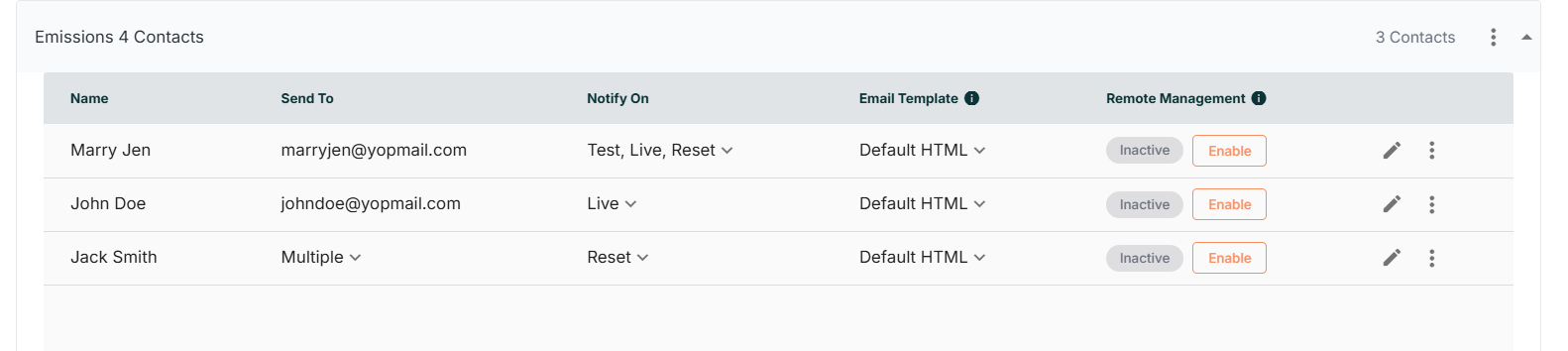
- Navigate to SSAS Contacts.
- Enable Remote Management for the required contact.
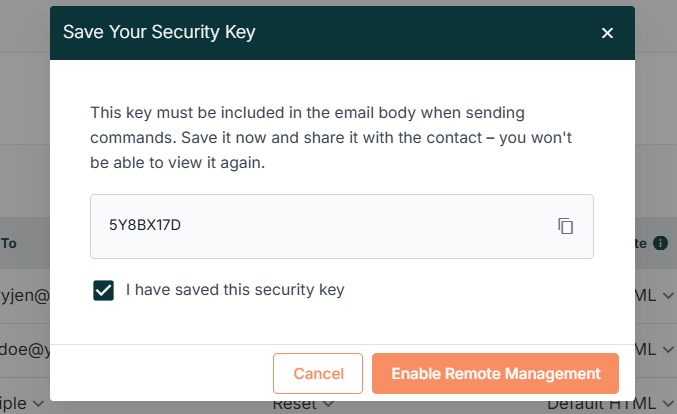
- A security key will be generated.
- Save this key securely - it will only be shown once.
- This key is required in all command emails.
Sending Remote Commands
All commands must be sent via email using the following structure:
To:cmd@ssas.podium5.com
Subject: <COMMAND> IMO:<VESSEL_IMO>
Body:
ID: <DEVICE_ID>
KEY: <SECURITY_KEY>
Ensure all fields are included before sending the email.
1. Start Test Mode
To initiate SSAS test mode:
To: cmd@ssas.podium5.com
Subject: CMD:START-TEST IMO: 1000008
Body:
ID:01037984SKY9F5D
KEY:5Y8BX17D
The system will:
- Validate the request and send an acknowledgment email to the authorized user
- Activate test mode for the vessel
- Default duration is 90 minutes unless ended earlier via the application or email command
- All alerts raised during this time will be treated as test alerts
2. End Test Mode
To exit test mode:
To:cmd@ssas.podium5.com
Subject: CMD: END-TEST  IMO: 1000008
Body:
ID: 01037984SKY9F5D
KEY: 5Y8BX17D
The system will:
- Deactivate test mode
- Return the device to normal operation
3. SSAS Alert Acknowledgment Emails
When an SSAS alert is raised, an acknowledgment email is automatically sent to all contacts with Remote Management enabled.
This email includes a Reset Code, which is required to reset the alert via email commands.
Test Alert Acknowledgment
To: johndoe@gmail.com
Subject: TEST SSAS ALERT RECEIVED - IMO:7654321
Body:
TEST SSAS ALERT RECEIVED
Vessel IMO:1000001
Device ID: 01037984SKY9F5D
Timestamp: <UTC>
Reset Code: 5TGMU
Live Alert Acknowledgment
To: johndoe@gmail.com
Subject: LIVE SSAS ALERT RECEIVED - IMO:7654321
Body:
LIVE SSAS ALERT RECEIVED
Vessel IMO:1000001
Device ID: 01037984SKY9F5D
Timestamp: <UTC>
Reset Code: A1B24
4. Resetting a Live or Test SSAS Alert
To reset an active Live or Test SSAS alert, send an email in the following format
To:cmd@ssas.podium5.com
Subject: RESET:<VESSEL_IMO>
Body:
ID:01037984SKY9F5D
Key:5Y8BX17D
Code:<Reset Code>
The Reset Code must match the code provided in the SSAS alert acknowledgment email (Live or Test).
The system will:
- Validate the request and send an acknowledgment email to the authorized user
- Reset the alert test mode
- Send the reset notification to permitted contacts
Additional Information
- Remote commands are only processed for contacts with Remote Management enabled.
- The security key must be included in every command email.
- A single reset code is generated per alert and reused until the alert is reset.
- Once an alert is reset, the reset code becomes invalid.
- Commands with missing or incorrect details will be rejected.
- A confirmation email is sent for every command, indicating success or failure.